"Can we pull it in?" is the oldest question on a construction job, and the honest answer is almost never yes or no. It is: by how much, at what cost, and what would have to change on site to make it real.
Most planning tools cannot help with that, because they are drawing packages. They will happily let you drag a bar and watch the finish move, but they will not tell you what the move costs, whether the crews could actually do it, or what the cheaper version of the same idea looks like. So the answer gets made up in the meeting, and the programme is reissued to match the answer.
You are chasing time or money. Say which.
In GeneraGantt the run starts with that choice, because it changes everything downstream. Chasing a date is a different search to chasing a budget, and a run over the whole programme is a different search to a run over one phase.
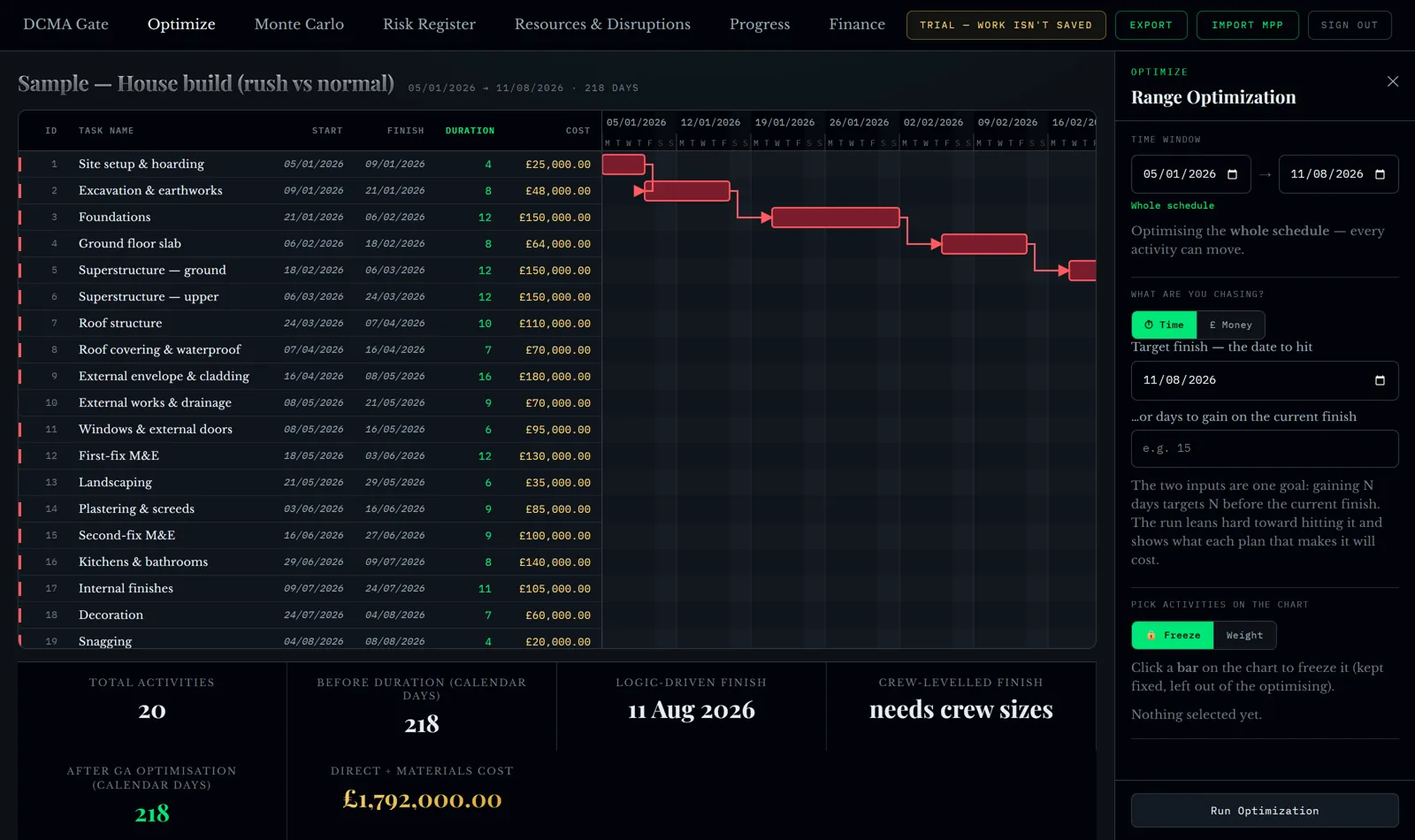
Behind that panel is a multi-objective search — NSGA-III — over the sequence of the work and the way each activity could be done. It is not a language model guessing at a plan. It builds candidate schedules, decodes each one against the real logic and the resources available, scores it, and keeps the ones that are not beaten on every measure at once.
Eight plans, not one "optimised" answer
This is the part I care most about. A single optimised schedule is a decision made on your behalf by software that does not know what your client will accept, what your subcontractors will wear, or how much of the prelim you can afford to spend. So the run returns a front: the genuine spread of options.
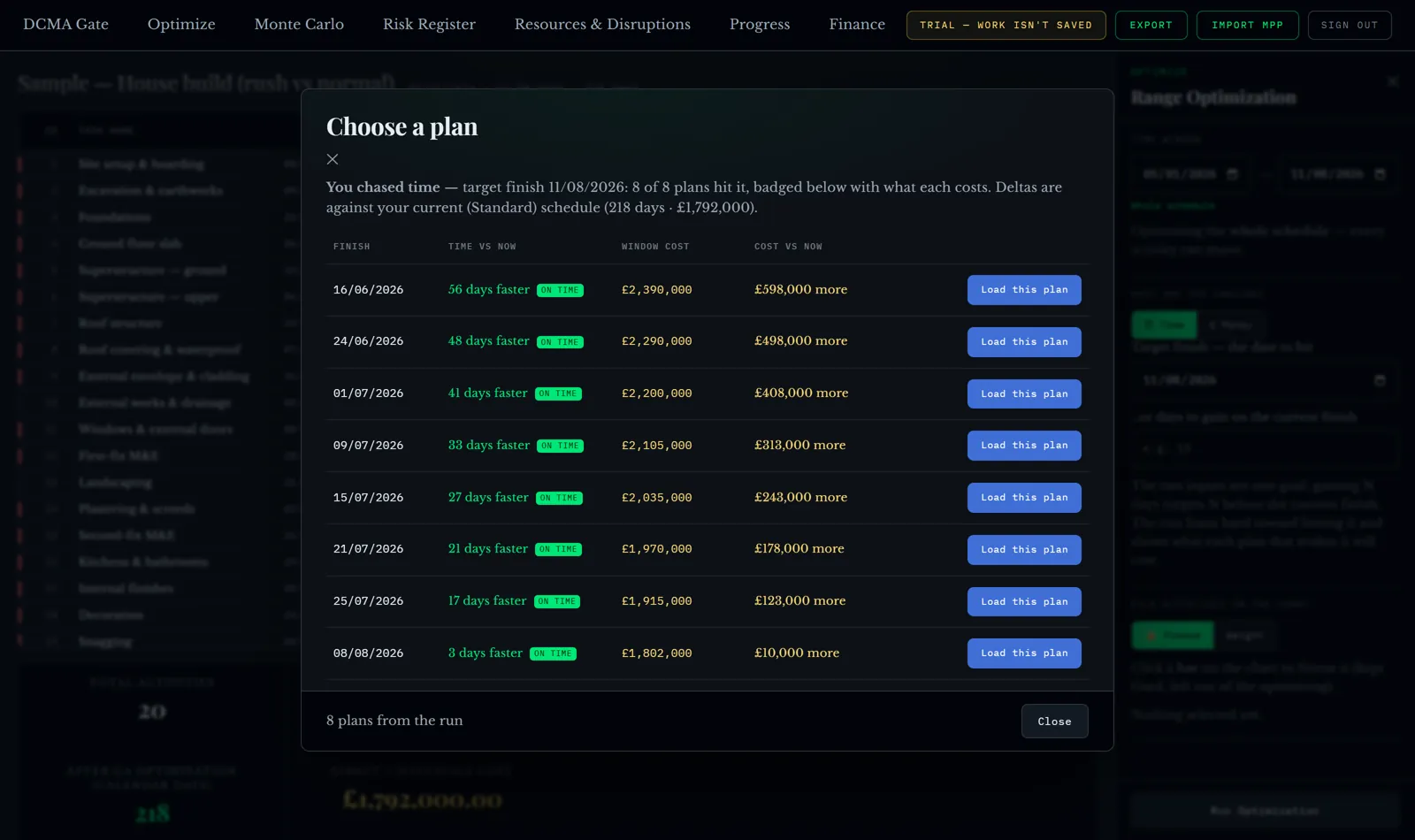
Read down that list and you can see where the value stops. The first few days are usually cheap: some resequencing, a bit of overlap. Then the price per day climbs steeply, because you are into paying for speed — extra crews, extra plant, weekend working. Knowing where that knee is worth more than any single recommendation, and it is the kind of thing that never appears in a programme narrative.
When there is nothing to trade, it says so
Here is the case that matters most for honesty, and the one that most tools get wrong.
A programme imported from MS Project or P6 usually carries one way of doing each activity. One duration, one crew, one cost. If there is only one way to do everything, then no amount of searching can trade time for money — there is literally nothing to trade. The right answer is to say that plainly.
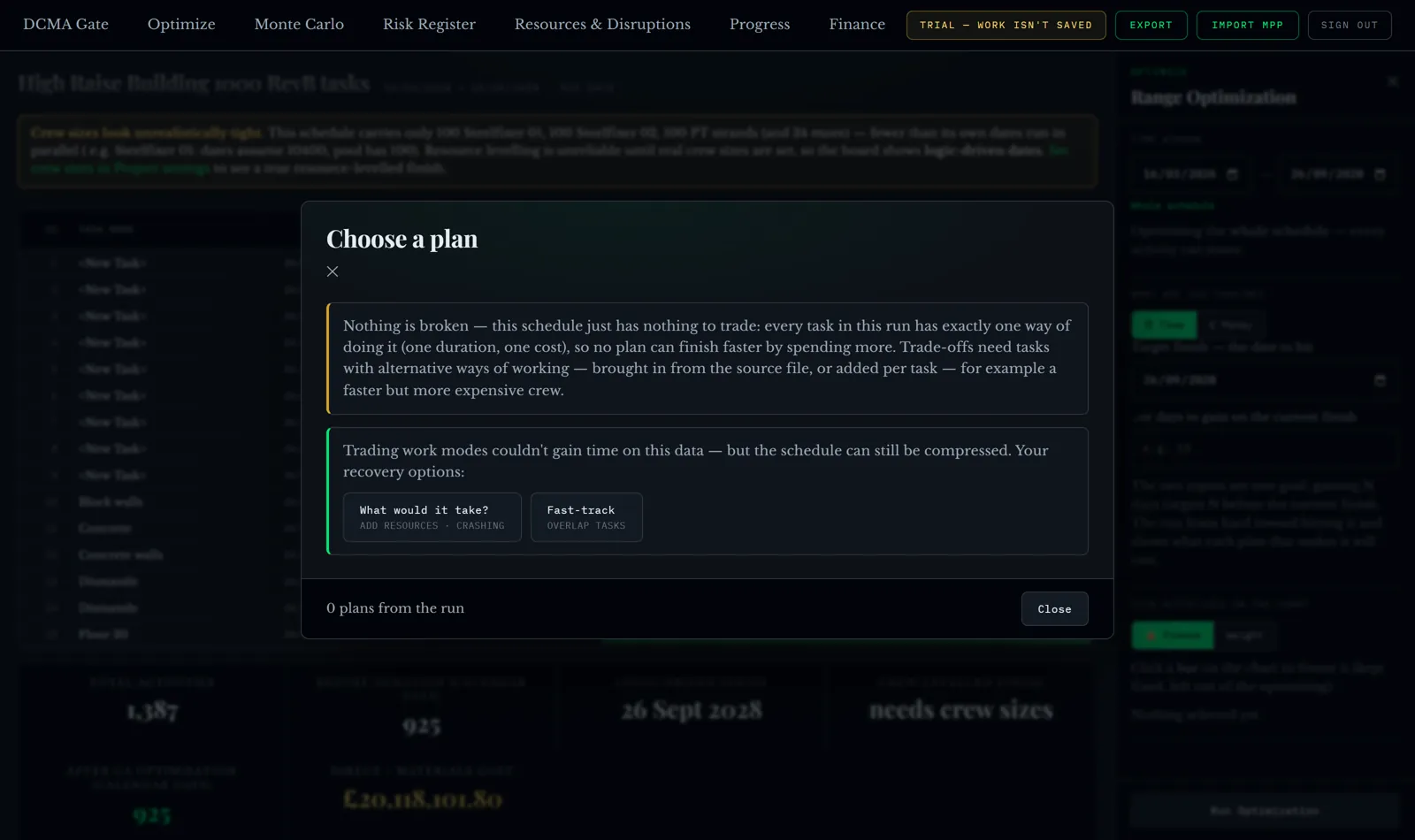
And then it points at what can still work: adding resources, or overlapping work that currently runs end to end. Those are the levers a planner actually has on a single-mode programme, and they are decisions for a person, not for an optimiser.
You can also ask the tool to invent a faster, dearer alternative for every activity, so the search has something to work with. That is a legitimate way to explore, and it is off unless you tick it — and every plan that leans on an invented alternative says so, on the row, with the count.
"What would it take?"
Ask for a date the current crews cannot reach and most software either refuses or quietly produces an impossible schedule. Neither is any use in a client meeting.
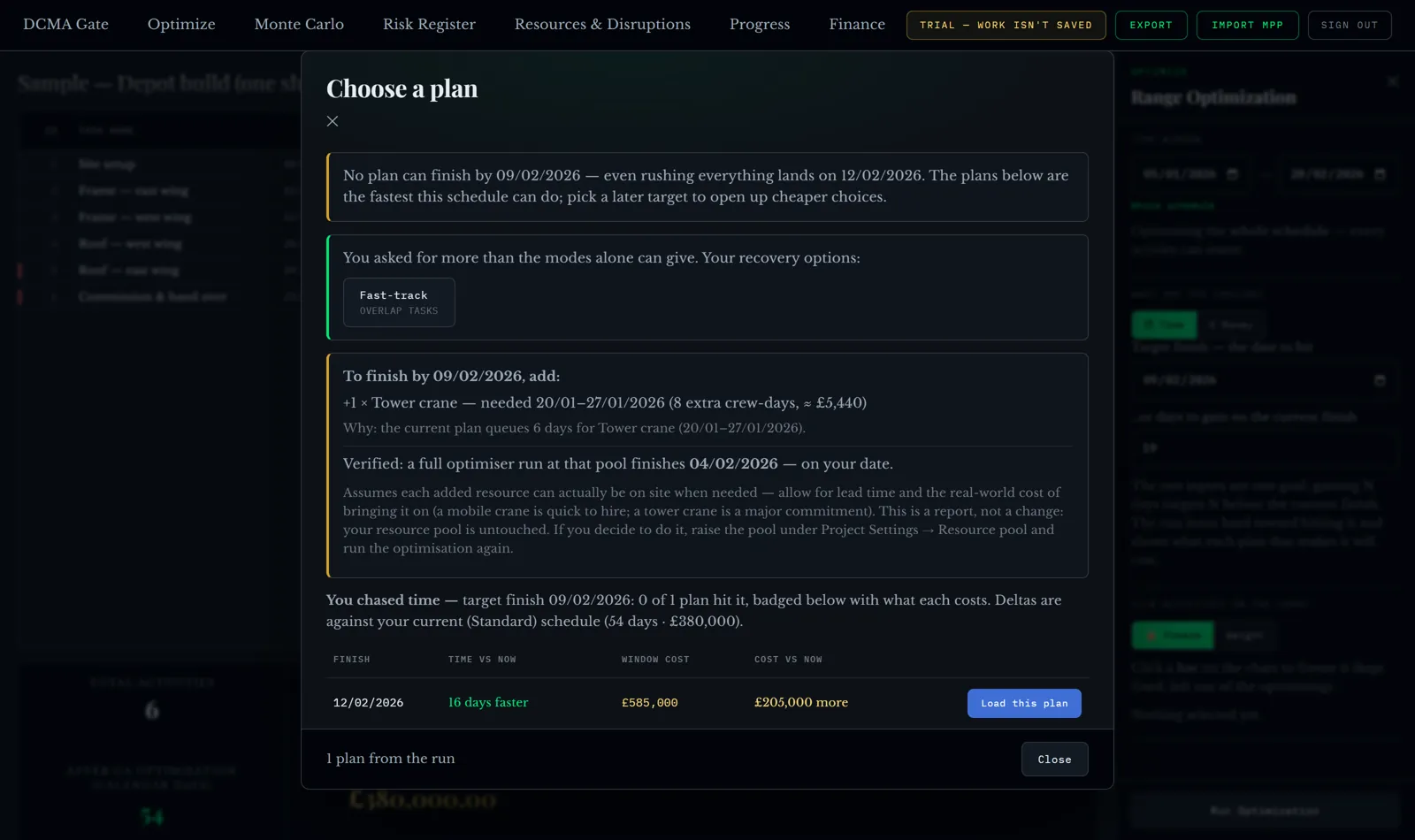
That is an answer you can take to a client: not "we can't", and not a promise you cannot keep, but the price of the promise. It also puts the lead time on the table, which is usually the thing that kills the idea two weeks later.
The money that has nothing to do with building
Most of the money in an overrun is not the building. It is the cost of being there: site staff, cabins, welfare, temporary power, plant on hire, scaffold — all running week after week whether or not anything is happening.
The tool maps that and puts a number on it. On this sample programme it is £4,790 for every week the job is open. Lean would call it non-value-adding, and all of it stops the day the job finishes.
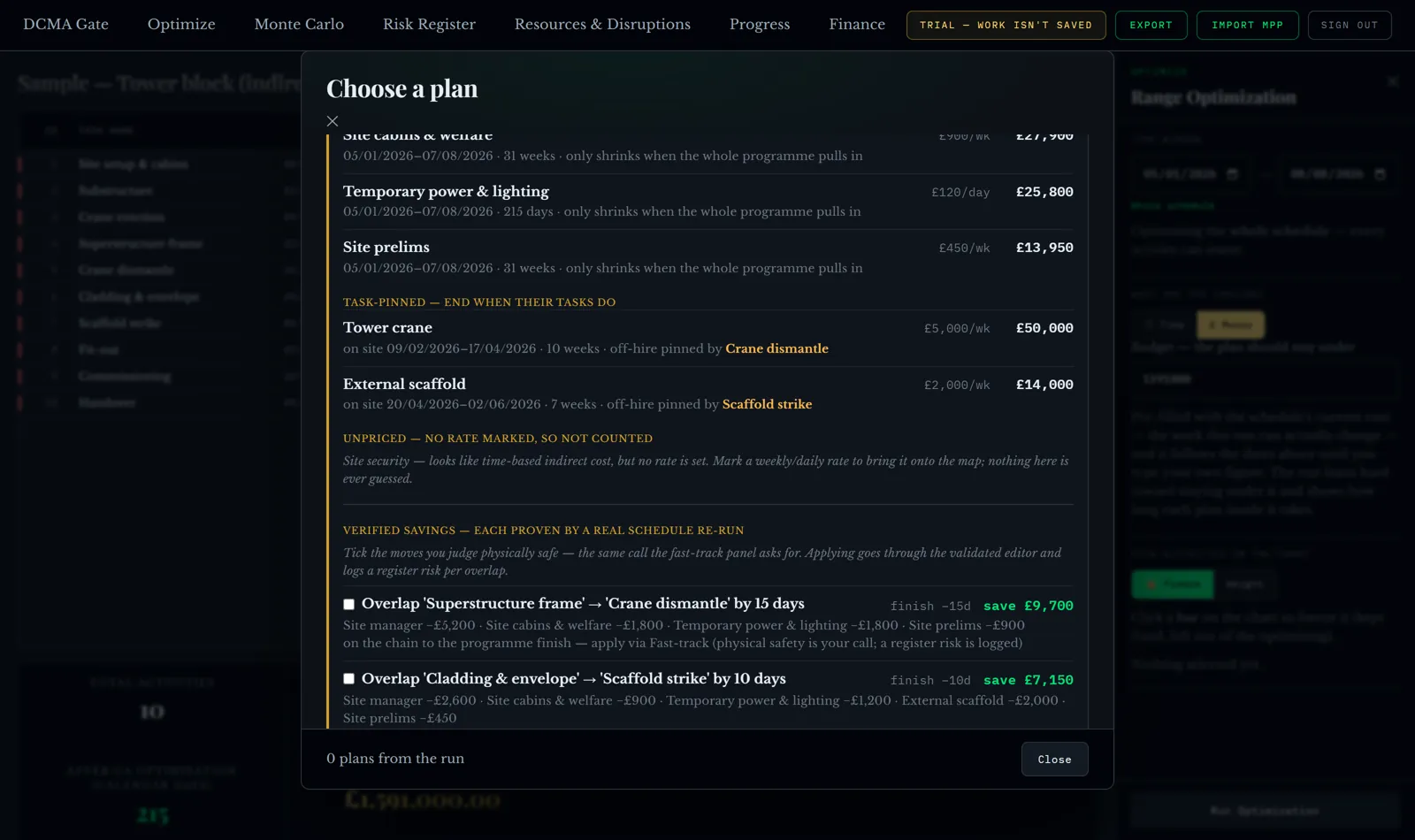
The savings finder is the part planners seem to like most when I show them, because it works the way a site person thinks: which specific activities are keeping an expensive thing on site, and what happens to the bill if they finish earlier. You tick the moves you judge safe. The tool does the arithmetic and logs the risk it introduces.
Load a plan and watch the programme reflow
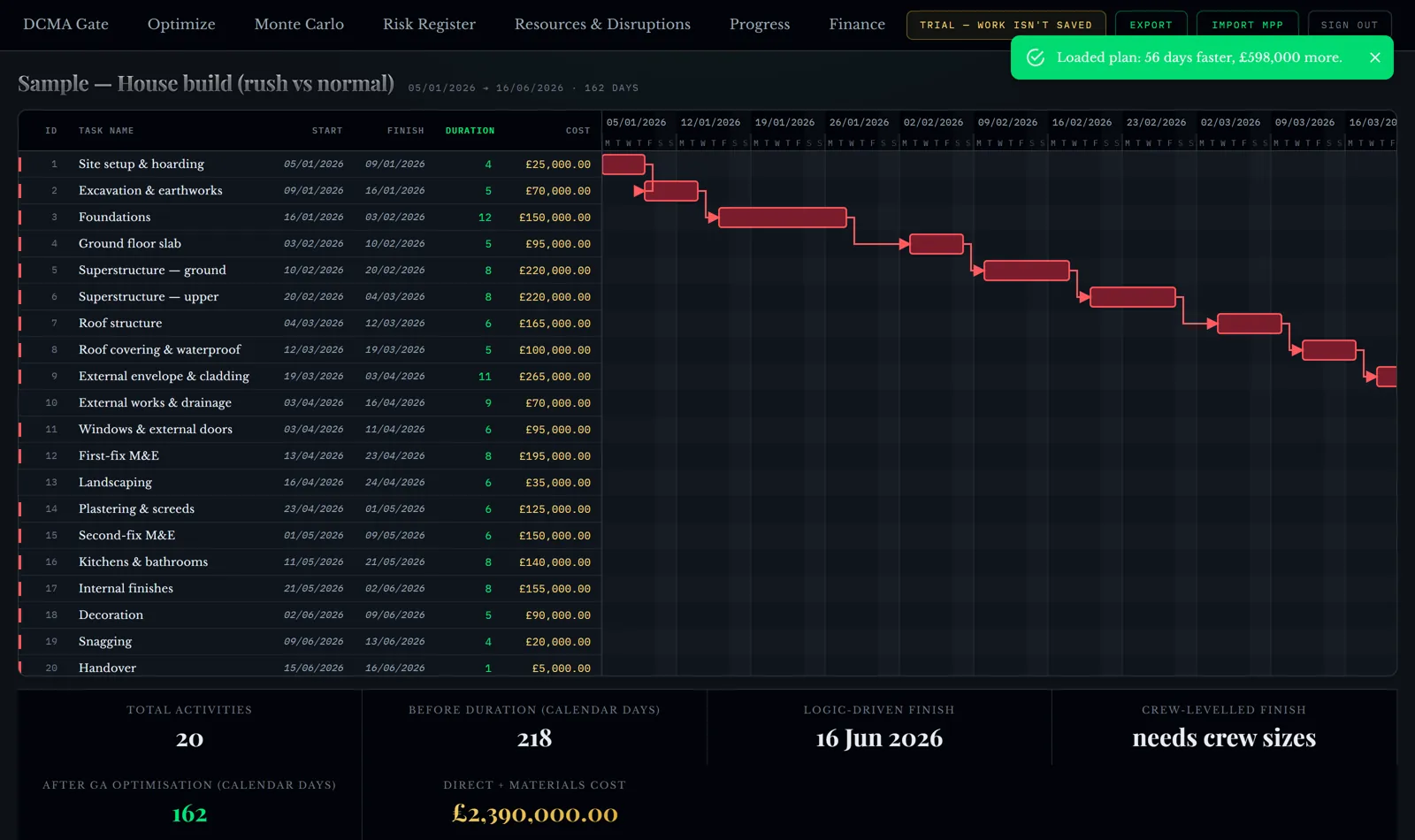
When you load one of the plans, the whole programme reflows around it and the critical path shows as a single continuous chain rather than a scatter of red bars. Where the file cannot support resource levelling — one carpenter gang where the dates assume eight, say — it shows logic-driven dates and tells you what to set, instead of producing a levelled plan that would be fiction.
What this does not solve
Optimisation does not know your client's tolerance, your subcontractors' availability next month, or the politics of the job. It cannot make a single-mode programme flexible. It will not tell you whether a 56-day saving is worth £598k — that is a commercial judgement, and the whole design is built to put that judgement in front of a person rather than behind an algorithm.
What it does do is stop the conversation being a guess. Every number on that front came from a real schedule run against your logic. If you disagree with one, you can open the plan and see the sequence it used.
Try it on something of your own
GeneraGantt reads MS Project, Primavera P6 and Asta Powerproject, and exports the chosen plan back to MS Project XML, Primavera XER or PMXML. Nothing is saved: your schedule lives for the session and leaves with you.
It is free while it is in testing, with a sample programme loaded, so you can run the optimiser and see the front without uploading anything.
Figures in this article come from the sample programmes in GeneraGantt.